


Description
Buy the BOYA BY-MW13 Wireless Lavalier Mic with Great Features and Best Price with Fast Delivery in Pakistan.

The BOYA BY-MW13 Wireless Lavalier Mic is made for people who want voice recording without holding a microphone.
Its dual wireless setup can help two speakers record together during interviews, videos, tutorials and other content. KunShop.pk brings this microphone to buyers at an affordable price with free home delivery across Pakistan.
BOYA BY-MW13 Wireless Lavalier Overview:
Recording good video is part of the job. Clear speech also matters, especially when you create interviews, educational videos or social media content.
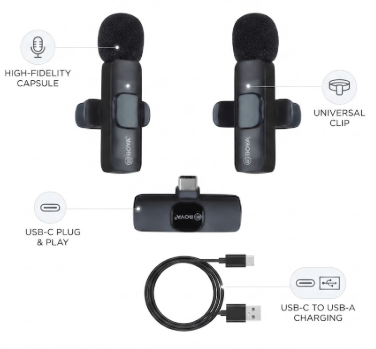
The BOYA BY-MW13 Wireless Lavalier Mic uses a receiver and 2.4GHz transmission to connect the microphone units with your recording device. Its lavalier format lets you clip the microphone onto clothing of holding it.
The dual arrangement adds flexibility for creators who regularly record conversations with another person.
What Makes This Mic Useful?
- Two‑microphone recording setup
- 2.4 GHz connection
- Clip‑on lavalier format
- Hands‑free operation
- Portable recording solution
- Useful for mobile video production
- Suitable for interviews and collaborative content
Key Features and Benefits:
Dual Microphone System for Two Speakers:
The biggest advantage of the BOYA BY-MW13 Wireless Lavalier Mic dual microphone setup is its ability to accommodate two speakers.
This saves time during interviews because each person can have a microphone. You also avoid passing one microphone between people while filming.
A dual system can be useful for:
- Interviews
- Two‑person vlogs
- Customer testimonials
- Tutorials
- Conversations
- Educational recordings
- Collaborative videos
For creators who frequently work with guests this arrangement can make the recording process easier.
2.4GHz Wireless Audio Connection:
The BOYA BY‑MW13 2‑G Mic uses the 2.4GHz band to send audio between the microphone units and receiver.
Wireless operation removes the need for a cable connecting the speaker to the recording device. This gives you freedom while moving around during a shoot.
Keep in mind that wireless performance depends on the environment. Walls, nearby electronics and other wireless signals can affect the connection.
Clip‑On Design for Hands‑Free Recording:
A microphone attaches directly to clothing. This keeps the microphone near the speaker while leaving both hands free.
The BOYA BY‑MW13 collar mic can work well during demonstrations, presentations, interviews and tutorials.
For voice pickup position the microphone is near the upper chest. Make sure clothing does not rub against the microphone during movement.
Compact Option for Mobile Creators:
Audio equipment can become inconvenient when you record outside a studio. A wireless lavalier setup takes space and can simplify mobile production.
The BOYA BY‑MW13 mobile mic can support creators who regularly record using a smartphone or other compatible device.
It can be useful for:
- Vlogging
- YouTube content
- TikTok videos
- Instagram reels
- Interviews
- Online teaching
- Product demonstrations
Specifications:
- Model: BOYA BY-MW13
- Microphone Type: Wireless Lavalier
- Wireless Frequency: 2.4GHz
- Microphone Configuration: Dual
- Form Factor: Clip-On
- Recording Style: Wireless Voice Recording
- Receiver: Included Wireless Receiver System
- Primary Use: Mobile Video and Voice Recording
- Suitable For: Interviews, Vlogging, Content Creation, and Tutorials
Voice Recording & Audio Performance:
Microphone placement has an effect on recorded speech. A lavalier microphone stays close to the speaker, which helps capture their voice without requiring an unit.
The recording environment still matters. Traffic, fans, wind, crowds and nearby conversations can affect the result.
For audio record in a quieter location whenever possible. Secure the microphone firmly. Avoid placing it against fabric that moves frequently.
Tips for Recordings
- Clip the microphone securely.
- Keep it near the speaker’s chest.
- Avoid clothing around the microphone.
- Test the audio before filming.
- Reduce background noise where possible.
Dual Mic Setup for Interviews:
Interviews often involve movement, changing positions and two people speaking at times. A BOYA BY‑MW13 interview mic setup can simplify this type of recording.
Each speaker can use their microphone rather than sharing one unit.
This can be useful for:
- Street interviews
- Business interviews
- Customer feedback
- Travel videos
- Educational discussions
- Couple videos
- Podcast‑style conversations
The result depends on your recording device and environment; always test your setup before an important shoot.
Wireless. 2.4 GHz Transmission:
The BOYA BY‑MW13 communicates with its receiver through the 2.4 GHz band.
Unlike a wired lavalier this setup does not require a physical audio cable running from each speaker to the recording device.
Wireless equipment can experience interference in environments. For recording keep the transmitter and receiver within a reasonable working distance.
A short test before filming can help you identify connection problems early.
Android, iPhone & Mobile Compatibility:
Compatibility is one of the important things to check before purchasing a smartphone microphone.
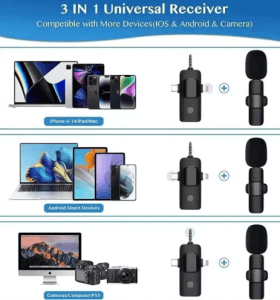
Different Android phones and iPhones can use connection ports. The receiver supplied with your microphone must match your recording device.
If you are looking for a BOYA BY‑MW13 mic for Android phones, check your phone’s port before ordering. iPhone users should also verify the required connection for their particular device.
For another mobile recording option, you can compare the J22 4‑in‑1 Wireless Lavalier Microphone with the BOYA BY‑MW13.
Battery & Charging Considerations:
Wireless microphones need power during operation. The exact battery capacity and runtime should be confirmed from the product package.
Than relying on an assumed runtime prepare your equipment before each recording session.
Before You Start Recording
- Charge the microphone units.
- Check the connection.
- Turn on the components.
- Test both microphones.
- Record a sample.
- Carry charging equipment for longer shoots.
This preparation becomes especially useful when recording interviews, events or outdoor content.
What Comes in the Box?
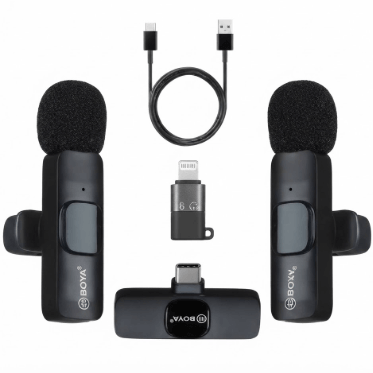
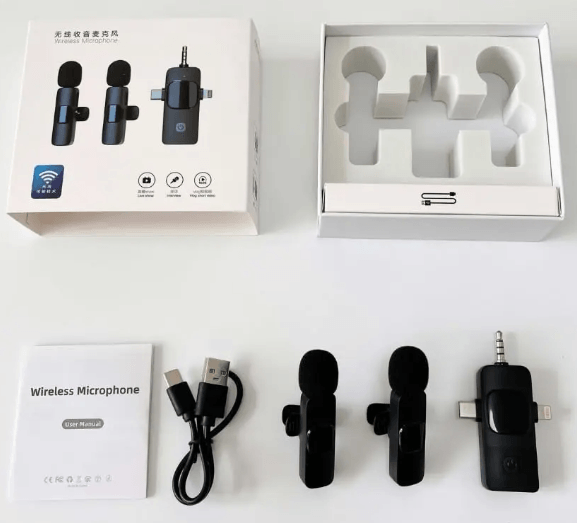
The BOYA BY-MW13 Wireless Lavalier Mic is listed as a wireless lavalier microphone system. However the exact accessories can depend on the package version at the time of purchase.
If you require a cable, connector charging accessory or microphone accessory confirm the current box contents with KunShop.pk.
The package generally focuses on the wireless microphone components and receiver needed for recording.
Always verify the package before ordering when a particular accessory is important to your setup.
Who Should Buy the BOYA BY‑MW13?
This microphone can suit people who record spoken content and want freedom than a wired microphone provides.
The two‑microphone arrangement is particularly useful when your videos involve another speaker.
Good Applications
- YouTube channels
- TikTok content
- Instagram reels
- Interviews
- Vlogging
- Online classes
- Product reviews
- Tutorials
- Livestream content
- Media production
It can also be useful for small content teams that need a straightforward two‑person recording setup.
BOYA BY‑MW13 for YouTube, TikTok & Reels:
Short‑form platforms rely heavily on understandable communication. Recorded speech can make otherwise good content harder to follow.
The BOYA BY‑MW13 microphone for YouTube videos provides a hands‑free approach to recording spoken content.
Creators can use the clip‑on format while walking, presenting products interviewing guests or recording demonstrations.
For media videos the setup can reduce cable clutter around the speaker and recording device.
BOYA BY‑MW13 for Vlogging:
Vlogging often requires you to move between locations. Carrying audio equipment can make these shoots less convenient.
The BOYA BY‑MW13 wireless collar mic for vlogging gives creators a recording option when using compatible devices.
It can work for:
- Travel vlogs
- Talking videos
- Walk-and-talk content
- Behind-the-scenes footage
- Product demonstrations
- Outdoor interviews
When filming outdoors pay attention to wind and surrounding noise. A microphone cannot completely compensate for a recording environment.
BOYA BY‑MW13 for Live Streaming & Mobile Content:
Live streaming leaves room for fixing audio problems afterward. Testing your microphone before going can prevent unnecessary interruptions.
The BOYA BY‑MW13 live microphone can be considered for mobile streaming setups.
Before starting a livestream check that:- The receiver connects correctly.
- Both microphone units are active.
- Your streaming application recognizes the audio.
- The microphone position remains secure.
- Your voice sounds clear in a test recording.
For audio equipment visit the Audio and Speaker category at KunShop.pk.
Pros and Cons:
A good buying decision should consider both the advantages and limitations of a product.
Pros:
- Two wireless microphones
- 2.4GHz wireless transmission
- Hands‑free clip‑on design
- Useful for interviews
- Convenient for two‑person videos
- Format
- Suitable for mobile content
Cons:
- Phone compatibility needs checking
- Wireless signals can face interference
- Recording quality depends on the environment
- Exact battery performance should be confirmed
- Package contents can vary by product version
How to Connect and Use the BOYA BY‑MW13?
The setup process depends on the receiver and recording device. Once you confirm compatibility the basic workflow remains straightforward.
Step‑by‑Step Setup
- Charge the microphone components.
- Connect the receiver to your device.
- Switch on the microphone units.
- Allow the wireless system to connect.
- Attach each microphone to the speaker’s clothing.
- Open your camera or recording application.
- Record a sample.
- Check the audio before filming.
Do not skip the test recording. It can reveal connection issues, clothing noise or incorrect microphone placement before you begin the shoot.
Care and Maintenance:
Wirless microphones contain components that require careful handling. Basic maintenance can helpkeep your equipment ready, for repeated use.
- Keep Your Mic in Good Condition
- Keep the microphone away from water.
- Store the components in a place.
- Protect the receiver from drops.
- Keep connection ports clean.
- Avoid pulling cables from connectors.
- Do not leave the equipment in heat.
- Charge the system before shoots.
After recording check the equipment for dust or moisture before storing it.
Is the BOYA BY-MW13 Right for Your Phone?
Before buying a BOYA BY-MW13 2.4GHz microphone for mobile identify the connection type required by your phone.
The BOYA BY-MW13 microphone may work for recording but the receiver must connect correctly to your device.
Check These Points Before Ordering
- Smartphone model
- Android or iPhone operating system
- Available connection port
- Receiver connector
- Recording application
- Current package configuration
If you’re uncertain contact KunShop.pk with your phone model before placing your order.
Why Buy From KunShop.pk?
Buying online should feel simple, clear and convenient. KunShop.pk serves customers throughout Pakistan with ordering and free home delivery.
You can see the price before ordering. Ask questions about compatibility or product availability.
Benefits of Ordering From KunShop.pk
- Affordable product pricing
- Free home delivery across Pakistan
- Online ordering convenience
- Customer assistance
- Mobile accessories available
- Audio products available
For another sound option you can also look at the K15 Dual Wireless Lavalier Microphone. Shop Mobile and Computer Accessories to find useful gadgets and small electronic items on KunShop.pk.
Frequently Asked Questions:
Is the BOYA BY-MW13 a wireless microphone?
Yes. The BOYA BY-MW13 is a wireless microphone system. It can accommodate two speakers during recordings.
Can I use the BOYA BY-MW13 for interviews?
Yes. The BOYA BY-MW13 two‑microphone setup works well for interviews because each participant can use a microphone.
Is the BOYA BY-MW13 suitable for YouTube videos?
The BOYA BY-MW13 can suit YouTube videos, interviews, vlogs, tutorials and other spoken‑content formats when paired with a recording device.
Does the BOYA BY-MW13 work with Android phones?
Compatibility depends on the connection and your specific Android phone. Check the required connector before ordering.
Can I use the BOYA BY-MW13 with an iPhone?
It depends on the iPhone model and receiver configuration. Confirm the required connection before purchase.
Is a lavalier better than a wired microphone?
Neither option is automatically better. The BOYA BY-MW13 wireless lavalier offers movement while a wired microphone can offer a simpler connection.
Can two people use the BOYA BY-MW13 at the time?
The BOYA BY-MW13 uses a dual‑microphone configuration making it intended for two‑person recording.
Can I use the BOYA BY-MW13 for TikTok and Instagram Reels?
Yes. The BOYA BY-MW13 clip‑on format can work well for interviews, demonstrations, vlogs and other short‑form video content.
Buy BOYA BY-MW13 Wireless Lavalier Mic Online in Pakistan!
If you need a BBOYA BY-MW13 Wireless Lavalier Mic in Pakistan buyers can order it online. This model gives an option for two‑person recording.
Its 2.4GHz wireless connection removes the need for microphone cables. The BOYA BY-MW13 lavalier format also keeps the speakers hands free during filming.
The BOYA BY-MW13 wireless microphone price in Pakistan is available at a price, through KunShop.pk. Prices and stock can change, so confirm the details before ordering.
Related Products
-
Sale!
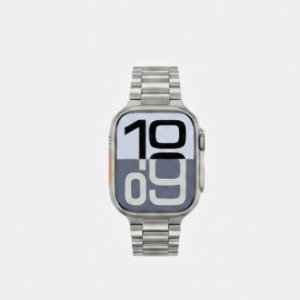
Series X Metal Chain Watch
Original price was: ₨ 3,399.₨ 2,699Current price is: ₨ 2,699. -
Sale!

Nokia 8210 4G
Original price was: ₨ 16,000.₨ 13,999Current price is: ₨ 13,999. -
Sale!

Nokia 210
Original price was: ₨ 8,000.₨ 6,600Current price is: ₨ 6,600. -
Sale!
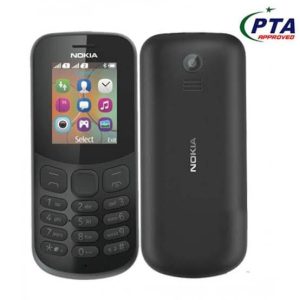
Nokia 130
Original price was: ₨ 8,999.₨ 4,300Current price is: ₨ 4,300. -
Sale!
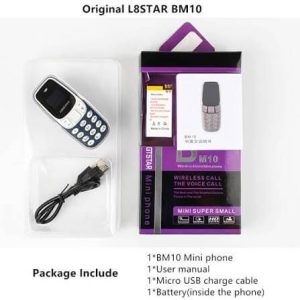
Nokia BM10 Mini Phone
Original price was: ₨ 8,000.₨ 4,499Current price is: ₨ 4,499.

Reviews
There are no reviews yet.